


Driving School Simulator
4.66.56K Reviews
App Specs
- Version
- 13.15
- Updated On
- License
- Free
- Downloads
- 10,000,000+
- Developer
- Ovidiu Pop
- Categories
- Racing
- Platform
- Android
Screenshots



 Analysis by AppCompare
I’d approach Driving School Simulator as a phone game for people who enjoy the small decisions of driving, not as a substitute for learning in a real car. Its appeal is the chance to practise staying attentive and handling a virtual vehicle at your own pace. The driving-school theme makes it approachable, though getting comfortable with its controls and deciding what kind of session you want can take a little patience.
Where the first minutes can feel awkward
The opening stretch of a driving game often asks you to learn two things at once: how the vehicle responds and how the game expects you to interact with the screen. I’d give myself a few minutes to try steering, acceleration and braking before treating a mission as a test of skill. If a turn feels clumsy at first, that does not necessarily mean the driving itself is difficult; it may simply take time to build a feel for the controls.
That distinction matters for beginners. A real learner can carry away useful habits such as looking ahead and avoiding rushed decisions, but a phone screen cannot reproduce the physical feedback, judgement or responsibility of an actual car. I’d use the game to make traffic situations feel less unfamiliar, then rely on qualified instruction and real-world practice for road learning.
Small setup checks that save frustration
Before a longer session, I’d check that the game has finished loading and that the phone is running smoothly. Closing other demanding apps can help if the device feels sluggish, while restarting the game is a reasonable first step if a screen stops responding. These are ordinary mobile-game checks rather than special fixes, but they can prevent a temporary device hiccup from being mistaken for a problem with driving.
I’d also choose a quiet moment for the first few lessons or challenges. Trying to learn the controls while distracted makes even a forgiving game feel harder. If the available control arrangement feels uncomfortable, take time to explore the on-screen options and settle on a setup that suits your hands before judging the handling. The best choice is the one you can use consistently, not the one that looks most realistic.
Recovering when a run goes wrong
When I make a mistake in a driving mission, I find it more useful to identify the moment that caused it than to restart immediately and repeat the same approach. Was I turning too late, accelerating before I had lined up, or concentrating on the route instead of the traffic? Changing one thing on the next attempt makes a challenge feel like practice rather than a string of arbitrary failures.
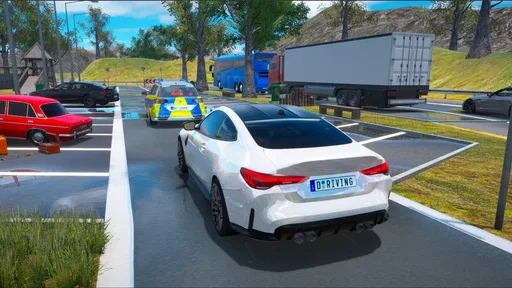
For parking, for example, I’d slow down and make small corrections instead of trying to fix the whole angle with one sharp movement. In busier driving sections, looking farther along the road can give you more time to react than staring at the car itself. Those habits are useful in the game, but I would not treat a successful virtual manoeuvre as proof that I’m ready to perform it on a public road.
Worth Reading Before You Choose

EA SPORTS FC Mobile 26 Is a Bigger Football Game, but It Takes Time

Flipboard Shows What News Apps Must Do Beyond the Feed

Switching to Android Auto Means Rethinking Your Driving Routine

Google Calendar Makes a Crowded Week Easier to Manage

Ludo King Makes the Most of the Minutes Between Plans

Baby Panda World Brings Quick Play to Modern Phones, but Its Game Library Feels Busy
Getting Behind the Wheel
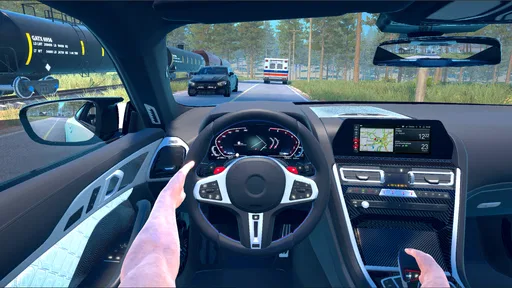
First things first, downloading and setting up Driving School Simulator is a breeze. The interface is super user-friendly, and before you know it, you’re sitting in the driver’s seat of your choice, ready to take on the world. The game offers a wide range of vehicles, from compact cars to hefty trucks, so there’s something for everyone’s taste.
Learning the Ropes
Now, what I love about this app is the way it eases you into the driving experience. The tutorials are detailed and helpful, without being overwhelming. Whether you’re a seasoned driver looking to polish your skills or a newbie just starting out, the app adjusts to your level. I particularly appreciated the realistic driving mechanics, which made me feel like I was really out on the road.
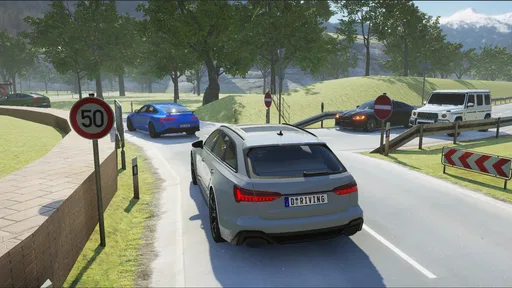
One of the standout features has to be the realistic traffic rules and road signs. It’s like having a driving school instructor right there with you, but without the anxiety! The app covers everything from basic maneuvers to complex traffic situations, making it a comprehensive learning tool.
Exploring the Open World
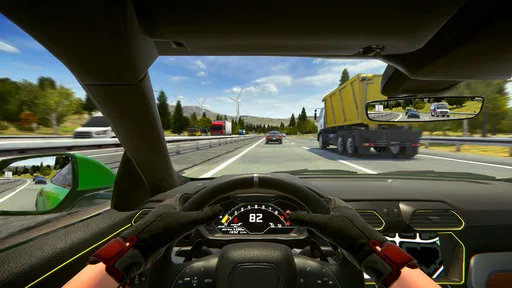
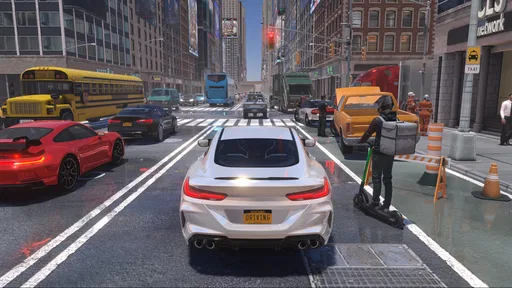
Let’s talk about the environments, because, wow, they’re stunning. The game offers a variety of beautifully designed maps that replicate real-world driving conditions. You can drive through bustling city streets, serene country roads, and even challenging mountain terrains. The attention to detail in the scenery is impressive and adds a whole new layer of immersion to the experience.
Driving School Simulator also has a dynamic weather system that really keeps you on your toes. One minute you’re cruising under a clear blue sky, and the next you’re navigating through a torrential downpour. It’s these little touches that make the app feel so realistic and engaging.
Choosing the right kind of session
As a racing game, it sits in a different lane from the usual alternatives built around drifting, rapid laps or arcade-style speed. I’d pick this one when I want to pay attention to road positioning, signs and controlled manoeuvres; if I’m after instant acceleration and a short burst of competition, a conventional arcade racer is likely a better fit. That calmer focus is a strength, but it also means players who want constant action may find the pace too measured.
The game is from developer Ovidiu Pop, and its driving-school framing gives it a clear identity within mobile racing. It is free to start, with optional in-app purchases ranging from $1.99 to $49.99 per item. I’d treat purchases as optional rather than necessary: first decide whether the basic driving loop holds your interest, then consider spending only if a specific addition feels worthwhile. The game is rated for Everyone, which makes it accessible to a broad audience, though parents may still want to check how in-app purchases are handled on a shared device.
A practical routine for everyday play
A realistic way to use it is a short evening session after work or school: choose one driving task, repeat it until the controls feel more natural, then stop before the practice turns into frustration. I would not try to master every vehicle or setting in one sitting. Switching cars can be entertaining, but it also changes the feel of the drive; sticking with one vehicle for a while makes it easier to tell whether a mistake came from my timing or from adjusting to a different ride.
For a beginner, I’d start with the gentler tutorial material and use more demanding traffic or parking situations only after the basic controls feel familiar. For an experienced player, the appeal is less about learning what a road sign means and more about enjoying a structured drive with rules to follow. A parent looking for a quiet game for a child may appreciate the non-violent driving focus, while someone seeking a realistic driver-training course should look elsewhere and use professional instruction.
When the phone or connection may be involved
If online play or another connected part does not behave as expected, I’d first check whether the phone has a stable connection and whether other online apps are working. If they are not, switching between Wi-Fi and mobile data or waiting until the connection settles is more sensible than repeatedly changing game settings. If the issue appears only in this game, closing and reopening it is a simple next step; persistent trouble is a reason to consult the game’s current support options rather than assume the device is at fault.
Performance can also depend on the phone, especially when a game is rendering detailed surroundings. If the image stutters, gets unusually warm, or controls respond late, I’d pause, let the device cool and close background apps before continuing. Keeping the game and operating system up to date is sensible general maintenance, but I would avoid promising that an update will fix a particular problem. The current version is 13.13, and the listed minimum operating system is Android 6.0.
What the audience response suggests
The game has a 4.6 average from around 401,000 ratings, alongside roughly 6,500 written reviews and over 10 million installs. That scale suggests it has found a substantial audience, but popularity alone cannot tell me whether its pace or controls will suit you. I’d use those figures as context, then make the decision based on whether a driving-focused game sounds more appealing than a fast, score-chasing racer.
Because it is free, trying it does not require an upfront purchase, but free access should not be confused with a promise that every item is included. If you are cautious about spending, check the purchase prompts carefully and avoid tapping through them automatically. On a family device, purchase controls are worth reviewing before handing the phone to a child, even with an Everyone content rating.
Exploring the Open World
Let’s talk about the environments, because, wow, they’re stunning. The game offers a variety of beautifully designed maps that replicate real-world driving conditions. You can drive through bustling city streets, serene country roads, and even challenging mountain terrains. The attention to detail in the scenery is impressive and adds a whole new layer of immersion to the experience.
Driving School Simulator also has a dynamic weather system that really keeps you on your toes. One minute you’re cruising under a clear blue sky, and the next you’re navigating through a torrential downpour. It’s these little touches that make the app feel so realistic and engaging.
Challenges and More
For those who love a challenge, this app has got you covered. There are numerous driving missions and challenges designed to test your skills and keep you entertained. From parallel parking under pressure to high-speed highway drives, there’s always something new to master.
And if you’re feeling competitive, the multiplayer mode lets you go wheel-to-wheel with friends or other players online. It’s a great way to show off your skills and see how you stack up against others.
Where it fits—and where it doesn’t
The strongest reason to choose this game over a standard racing title is its interest in the process of driving rather than simply finishing first. Its missions, signs and traffic create a more deliberate rhythm, while the range of vehicles and environments gives that rhythm some variety. The trade-off is that players who mainly want tight lap times, deep vehicle tuning or a constant stream of high-speed action may be happier with a dedicated racing game.
I would also keep expectations realistic about what “practice” means here. Repeating a parking challenge can help me become more patient with positioning, but it does not teach the feel of a real steering wheel or account for local driving laws. Treat it as a game with educational flavour, not a replacement for an instructor. That boundary makes the experience more useful, not less: I can enjoy the scenarios without relying on them for real-world certification.
Final Thoughts
All in all, Driving School Simulator is a standout app that offers more than just a virtual driving experience. It’s an educational tool, a stress-buster, and a whole lot of fun rolled into one. Whether you’re prepping for your real driving test or just want to enjoy the thrill of driving without leaving your couch, this app has something to offer.
So, buckle up and hit the virtual road with Driving School Simulator. Trust me, it’s a ride you won’t want to miss!
Pros
- Realistic driving mechanics
- Diverse vehicle selection
- Various driving environments
- Detailed traffic rules simulation
- Customizable controls
Cons
- In-app purchases can be pricey
- Occasional performance lags
- Limited offline functionality
- Repetitive tutorial levels
- Ads can be intrusive
FAQs for Driving School Simulator
What features does Driving School Simulator offer?
Driving School Simulator provides a realistic driving experience with a variety of cars, environments, and weather conditions. It includes different driving modes such as manual and automatic transmissions. The app also offers a detailed tutorial mode to help beginners learn the basics of driving, along with various missions and challenges to test skills.
Is Driving School Simulator suitable for beginners?
Yes, Driving School Simulator is designed to cater to both beginners and experienced drivers. It includes a comprehensive tutorial mode that helps new drivers understand the basics of driving, traffic rules, and car mechanics. The gradual increase in difficulty levels ensures that beginners can progressively improve their skills.
What are the system requirements for Driving School Simulator?
Driving School Simulator requires Android version 5.0 or higher and iOS version 10.0 or later. For optimal performance, a device with at least 2GB of RAM is recommended. The storage space required varies depending on updates, but a minimum of 500MB is generally necessary to install and run the app smoothly.
Are there in-app purchases in Driving School Simulator?
Yes, Driving School Simulator offers in-app purchases. These purchases can include unlocking additional cars, environments, and special features. While the app is free to download, these optional purchases can enhance the gaming experience by providing more customization and content options.
Can I play Driving School Simulator offline?
Driving School Simulator can be played offline, allowing users to enjoy the game without an internet connection. However, certain features such as leaderboards, multiplayer modes, and updates require an active internet connection. Offline play is perfect for practicing and completing missions independently.


